
ReguFlow Pro
Your regulatory work. Connected.
Bring applications, approvals, licensee records and ongoing obligations into one workspace—configured around your legislation and the way your authority works.

Your legislation. Your workflow. Your licensees. Your oversight.
Demonstration using sample non-confidential data.
Regulatory delivery experience
Built from real regulatory work.
The experience behind ReguFlow Pro
Securities regulation · The Bahamas
Securities Commission of The Bahamas
CoRICompliance and Regulatory Interface

Amayztech delivered the CoRI Filings Portal for the Securities Commission of The Bahamas. Our work spans regulatory submissions, internal workflow and task management, and the digitisation of connected business processes.
Connected regulatory filings
Filings and submissions for registrants and licensees.
Work moving through the authority
Internal review, workflow and task management.
Connected regulatory operations
Digitised processes and integrated information.
That hands-on experience informs ReguFlow Pro—from how an application enters the authority to how information, decisions and responsibilities stay connected.
Explore the Commission’s Project Butterfly overview(opens in a new tab)Your legislation
Your framework. Built into the work.
Connect legislation and licence categories to the forms, requirements and obligations that apply. Configure the process around your mandate, with additional development where your requirements need it.
- LegislationYour regulatory framework.
- Licence categoryApplicable formsGuide applicants to the right submission.
- ApplicationDefined requirementsConnect the application to supporting information and documents.
- ObligationsContinuing obligationsCarry relevant requirements into the licensee record.
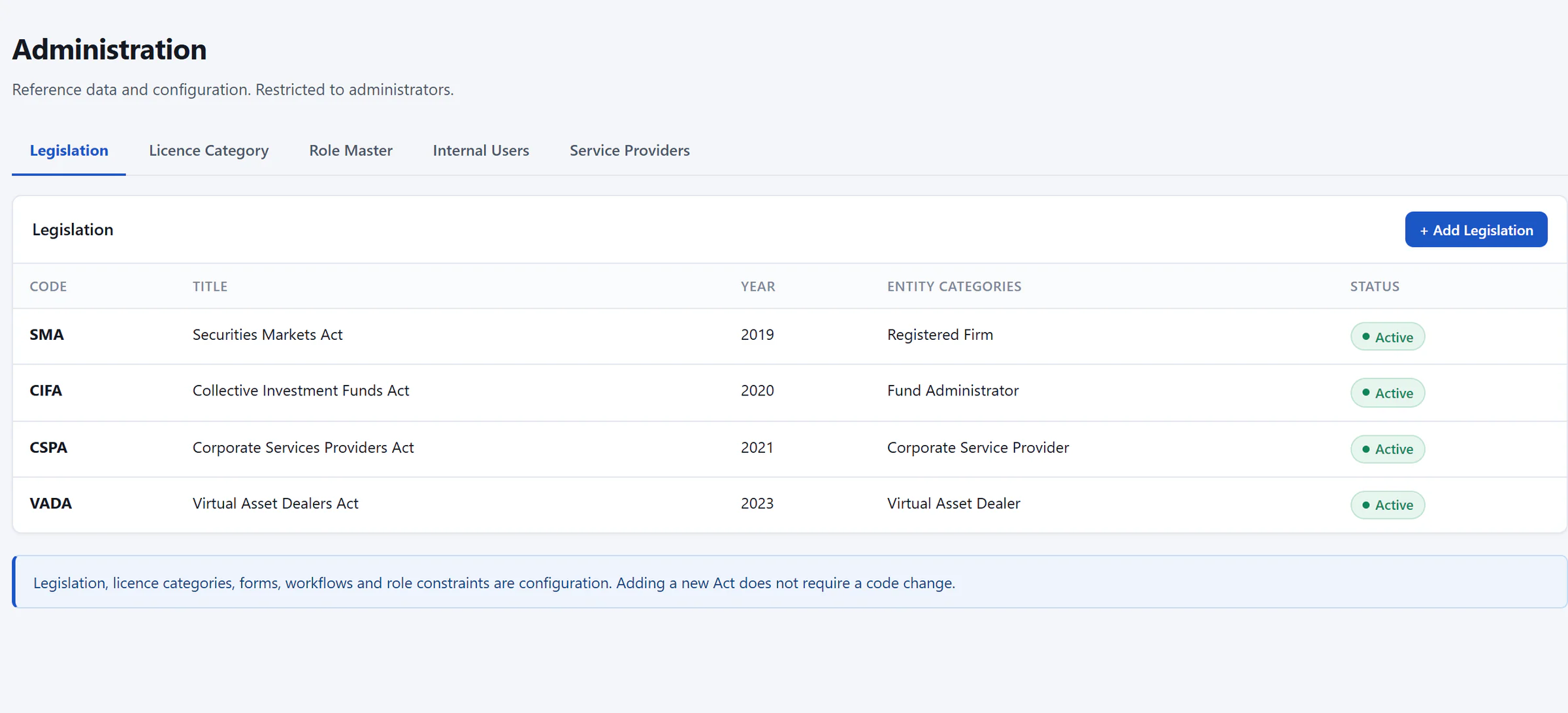

- Licence categories and roles configured alongside
- Each Act and the entity categories it governs
- Maintained as configuration by administrators
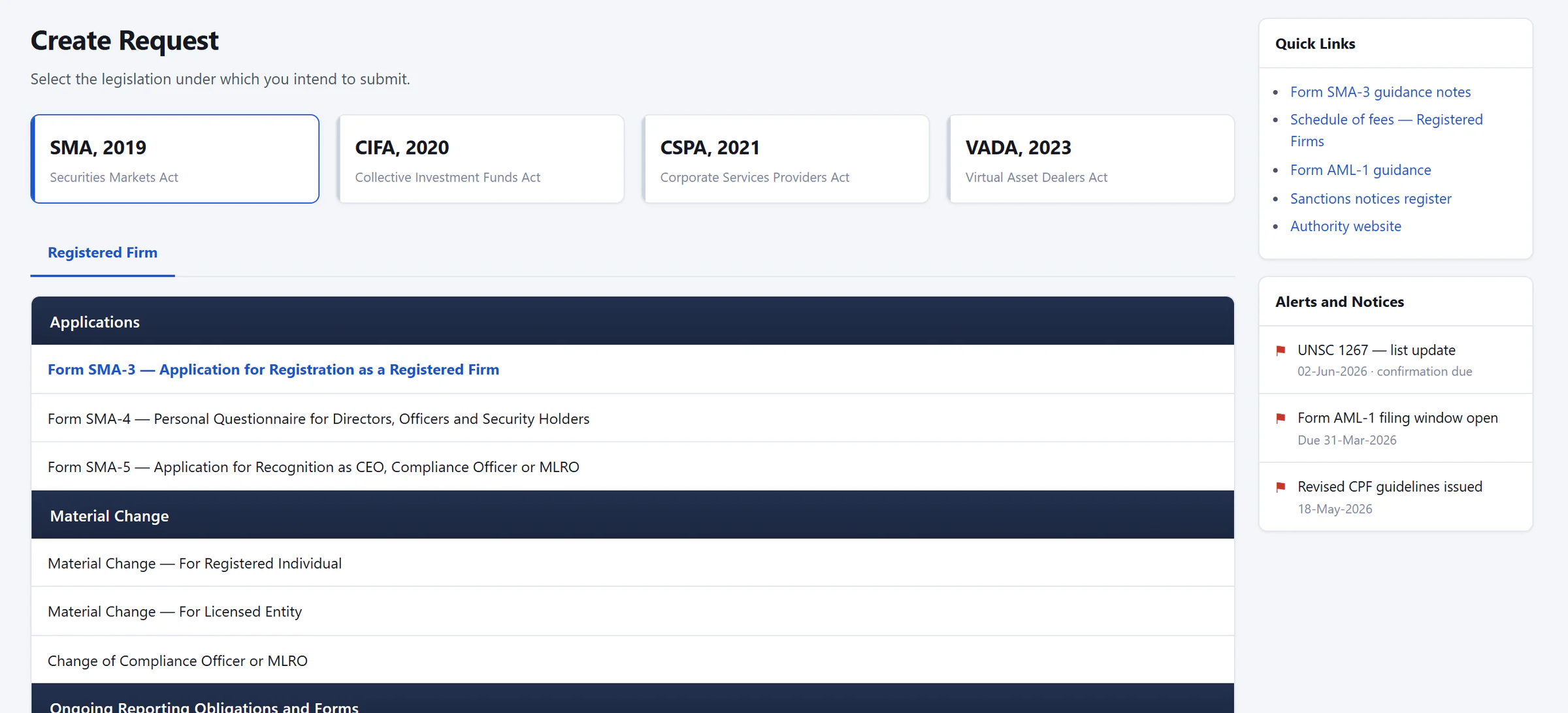

- The applicant chooses the governing Act
- Notices and due dates alongside
- Only the forms that apply are listed
Your workflow
Keep the application moving.
Route work to the right people, collect their assessments and move the application through your approval process. When information is missing, send it for rework and continue from the same record.
Automatic routing. Human assessment. Attributable decisions.
- Completed: Registrant
- Completed: Finance Officer
- Current: Supervision Officer
- Next: Senior Supervision Manager
- Next: Executive Director
Assigned automatically to the Supervision Officer once the application fee is confirmed.
WithSupervision Officer
From Finance Officer · Next: Senior Supervision Manager
Full handoff trail
- Completed: Registrant
- Completed: Finance Officer
- Current: Supervision Officer
- Next: Senior Supervision Manager
- Next: Executive Director
Assigned automatically to the Supervision Officer once the application fee is confirmed.
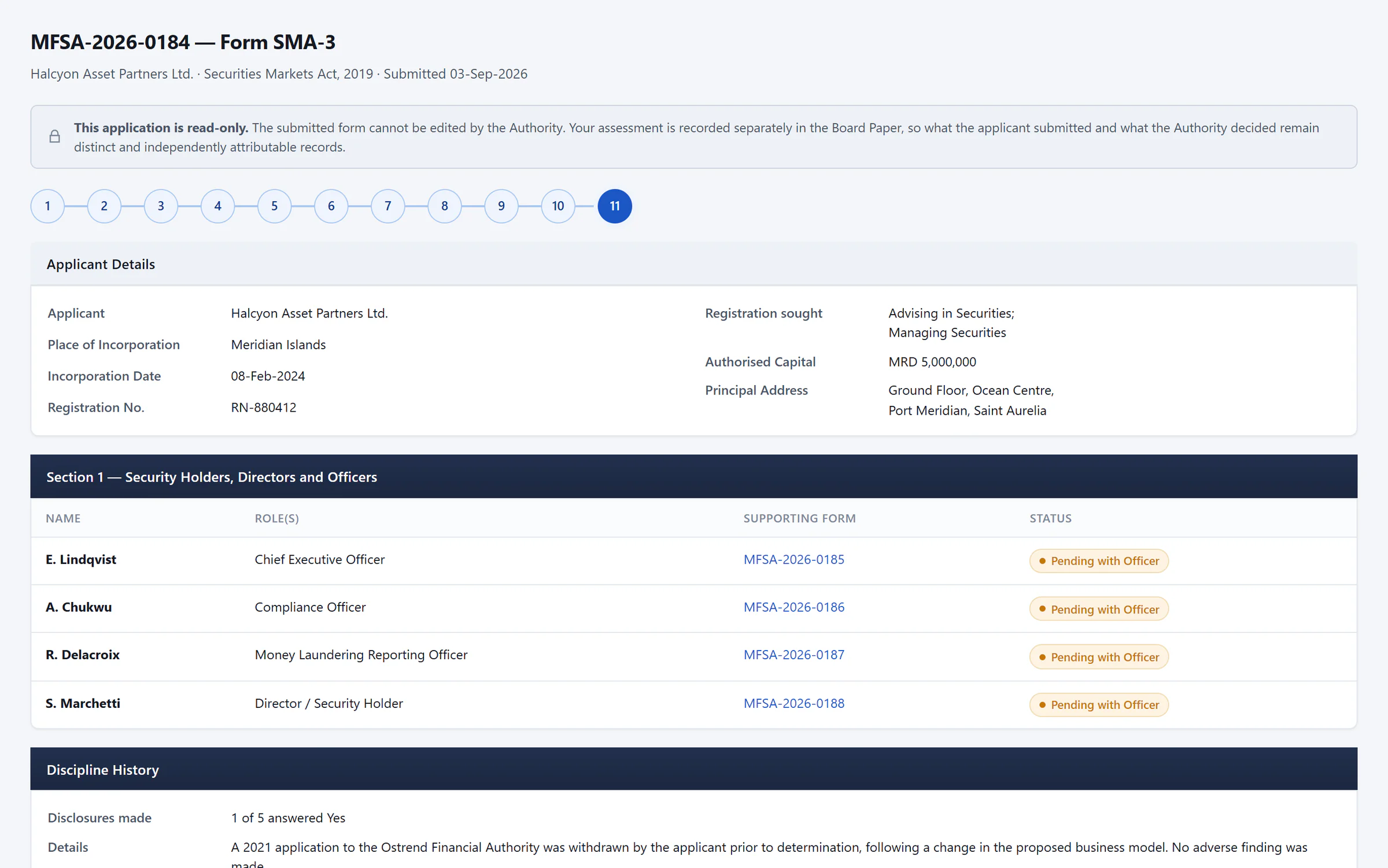

- Submitted information stays read-only
- Each linked individual assessed in turn
- Current: Registrant
- Completed: Finance Officer
- Next: Supervision Officer
- Next: Senior Supervision Manager
- Next: Executive Director
Returned to the registrant’s task queue with a deficiency letter; the officer’s board paper stays editable.
WithRegistrant
From Supervision Officer · Next: Supervision Officer, on resubmission
Full handoff trail
- Current: Registrant
- Completed: Finance Officer
- Next: Supervision Officer
- Next: Senior Supervision Manager
- Next: Executive Director
Returned to the registrant’s task queue with a deficiency letter; the officer’s board paper stays editable.
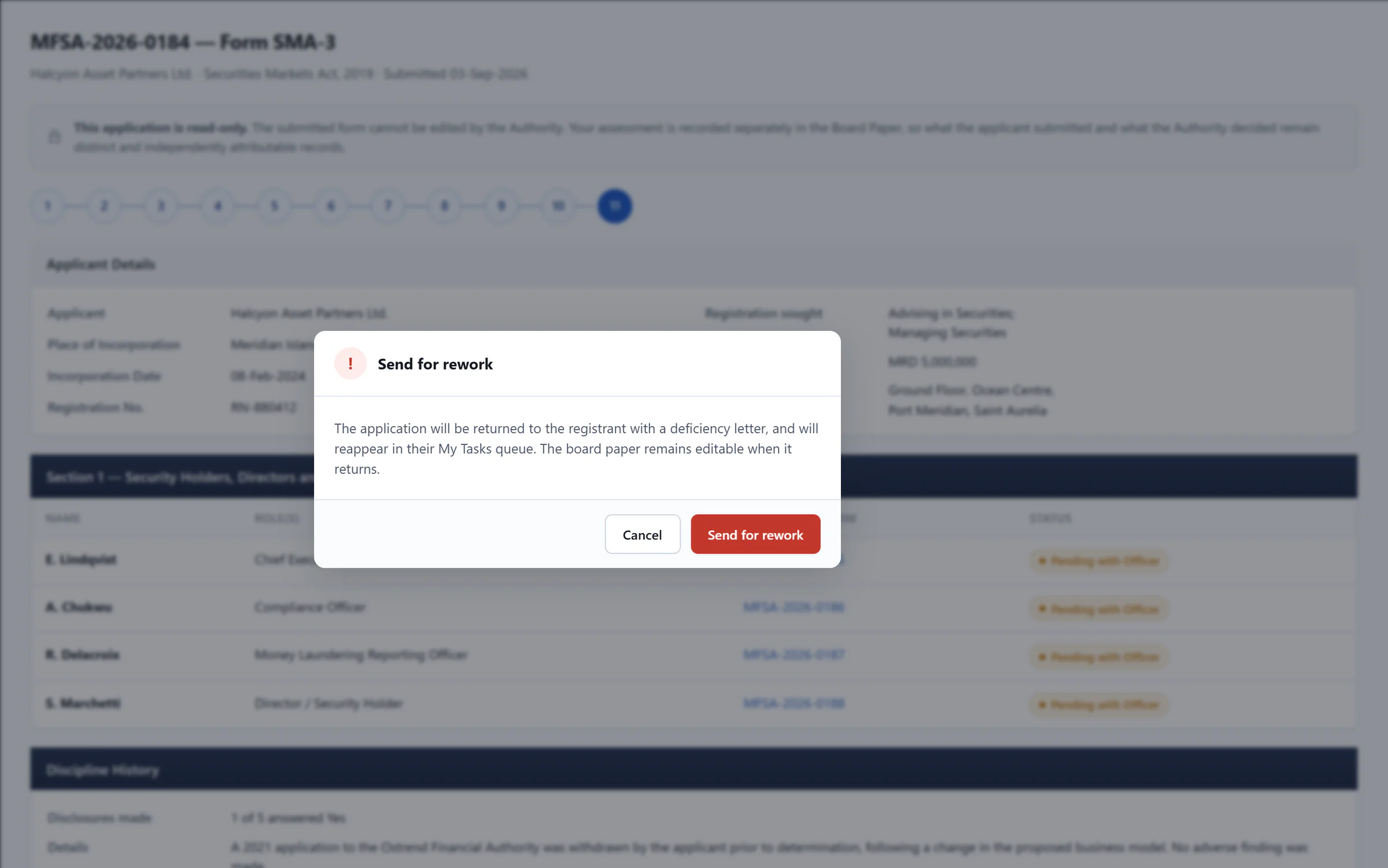

- Returned to the registrant with a deficiency letter
- Completed: Registrant
- Completed: Finance Officer
- Completed: Supervision Officer
- Completed: Senior Supervision Manager
- Current: Executive Director
Approved by the Senior Supervision Manager; the Executive Director’s decision is next.
WithExecutive Director
From Senior Supervision Manager · Next: Fee confirmation and licence issuance
Full handoff trail
- Completed: Registrant
- Completed: Finance Officer
- Completed: Supervision Officer
- Completed: Senior Supervision Manager
- Current: Executive Director
Approved by the Senior Supervision Manager; the Executive Director’s decision is next.
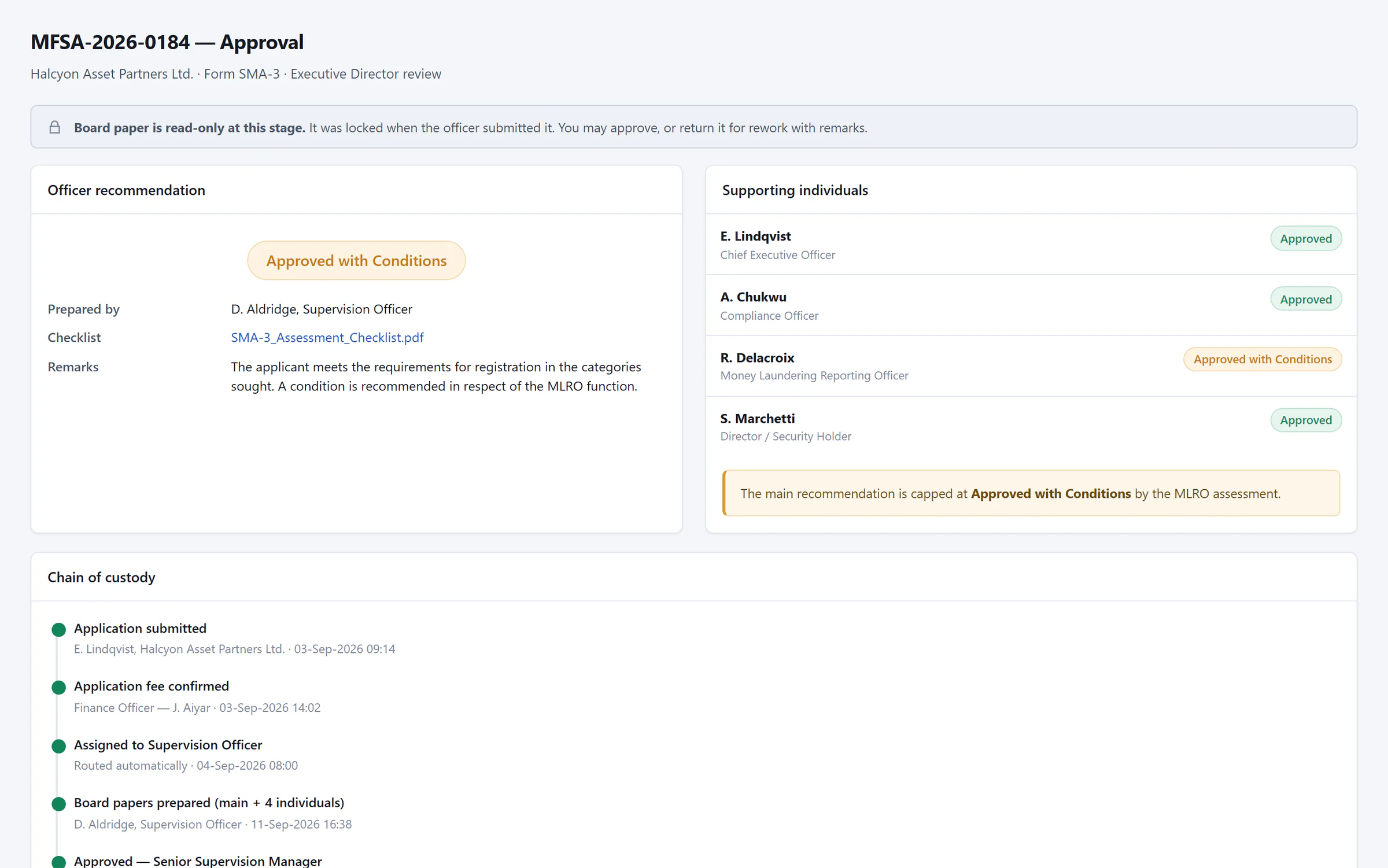

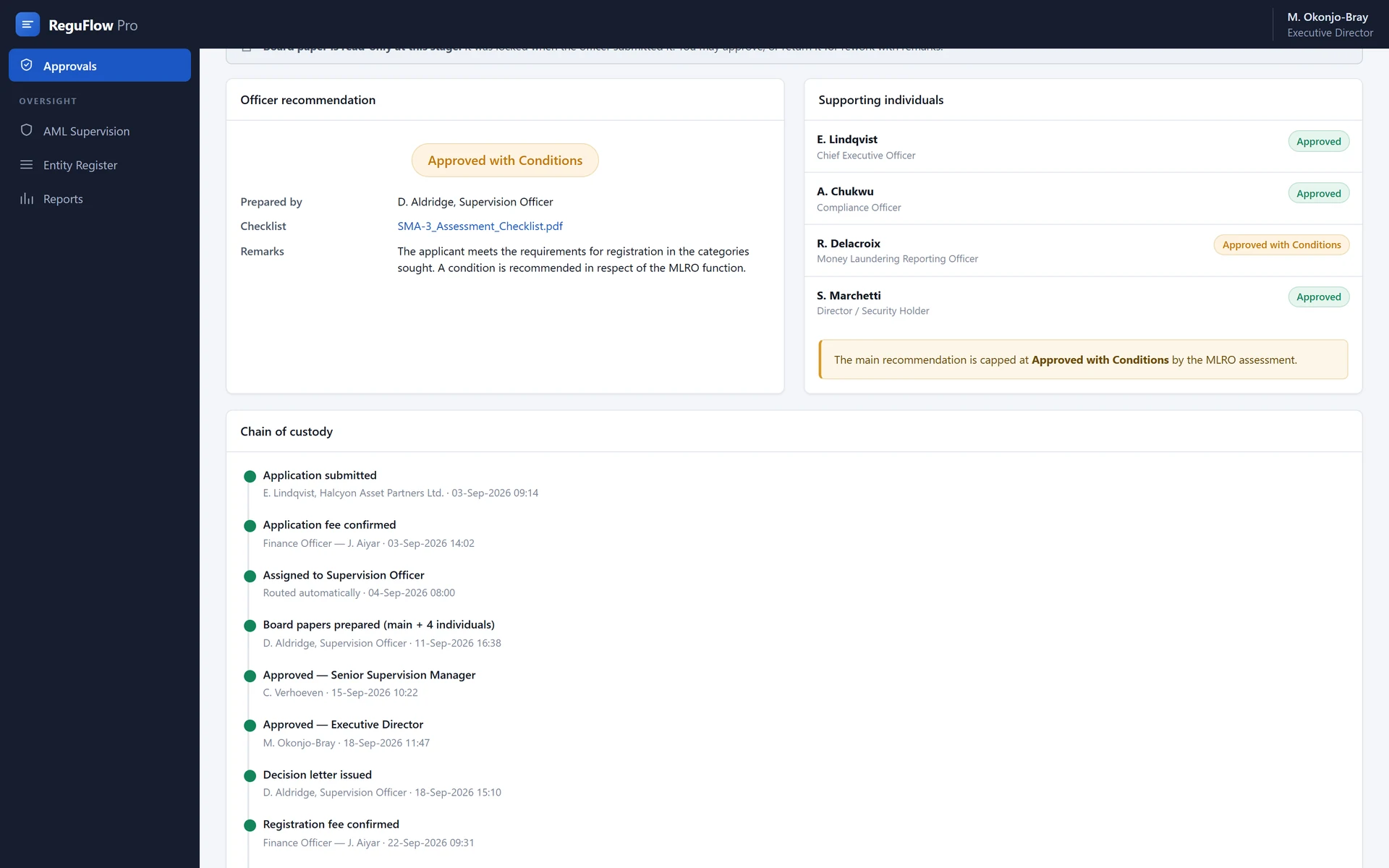
- Officer recommendation and checklist
- Capped by the sample authority’s configured rule
- Every approval attributed in the chain of custody
See how decisions are controlled
- Linked person assessmentsEach individual named on an application is assessed on their own merits.
- Submitted and assessed informationSubmitted information remains distinct from the authority’s assessment, so what the applicant claimed and what the supervisor concluded are both preserved.
- Decision rolesDifferent people can be required to prepare, review and approve important decisions. In the sample authority’s configured rule, a recommendation cannot exceed the lowest outcome recorded against any individual assessed under it.
- Fee gatesFee confirmation steps sit in the approval path ahead of licence issuance, and each step is attributed to the person who completed it.
Your licensee
The licence is only the beginning.
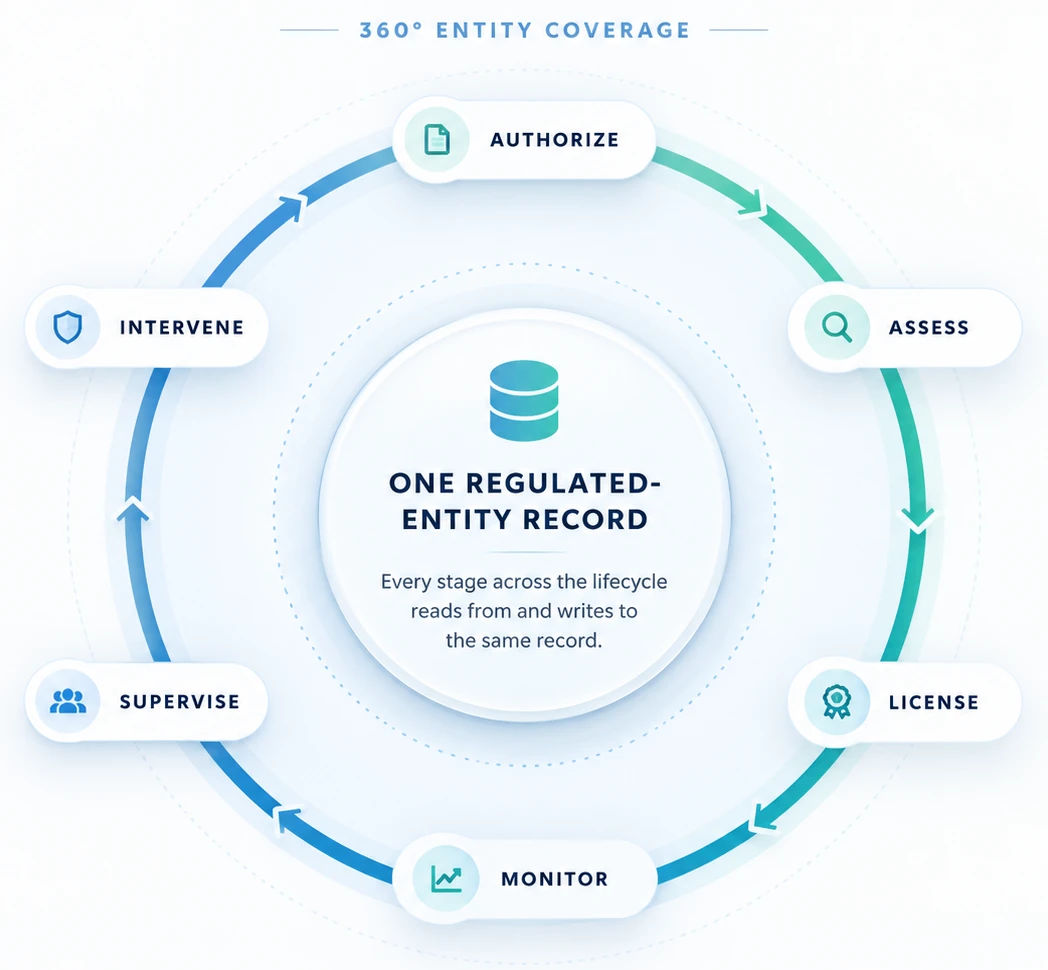
Keep licences, people, ownership, documents and obligations together in one connected profile. As the entity changes, its supervisory record grows with it.
The application becomes a licence.
The licence becomes an ongoing supervisory record.
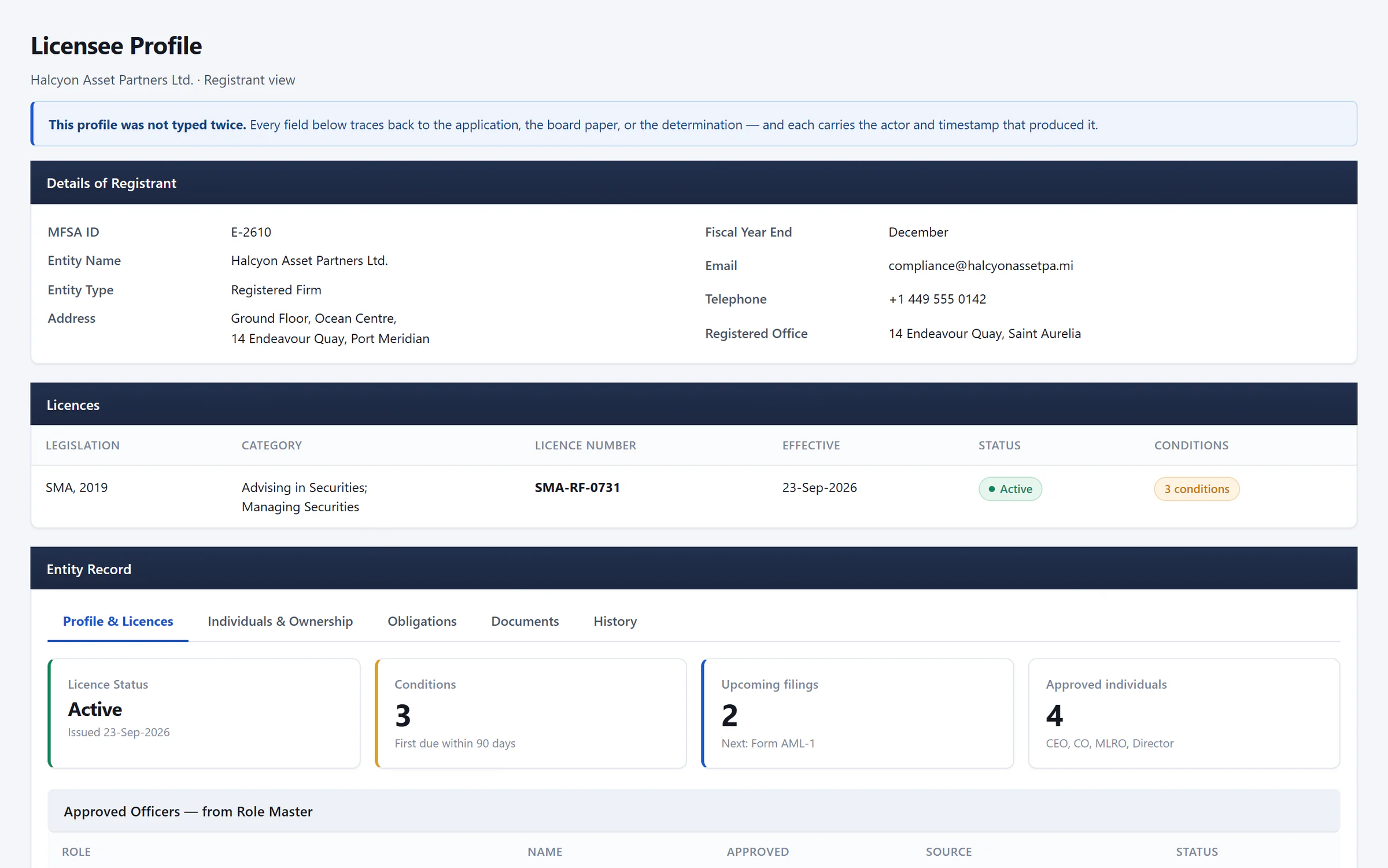

- Details carried from the application
- Licence status and conditions
- What is due, and who is approved, at a glance
Current status, licence conditions and key details in one place.
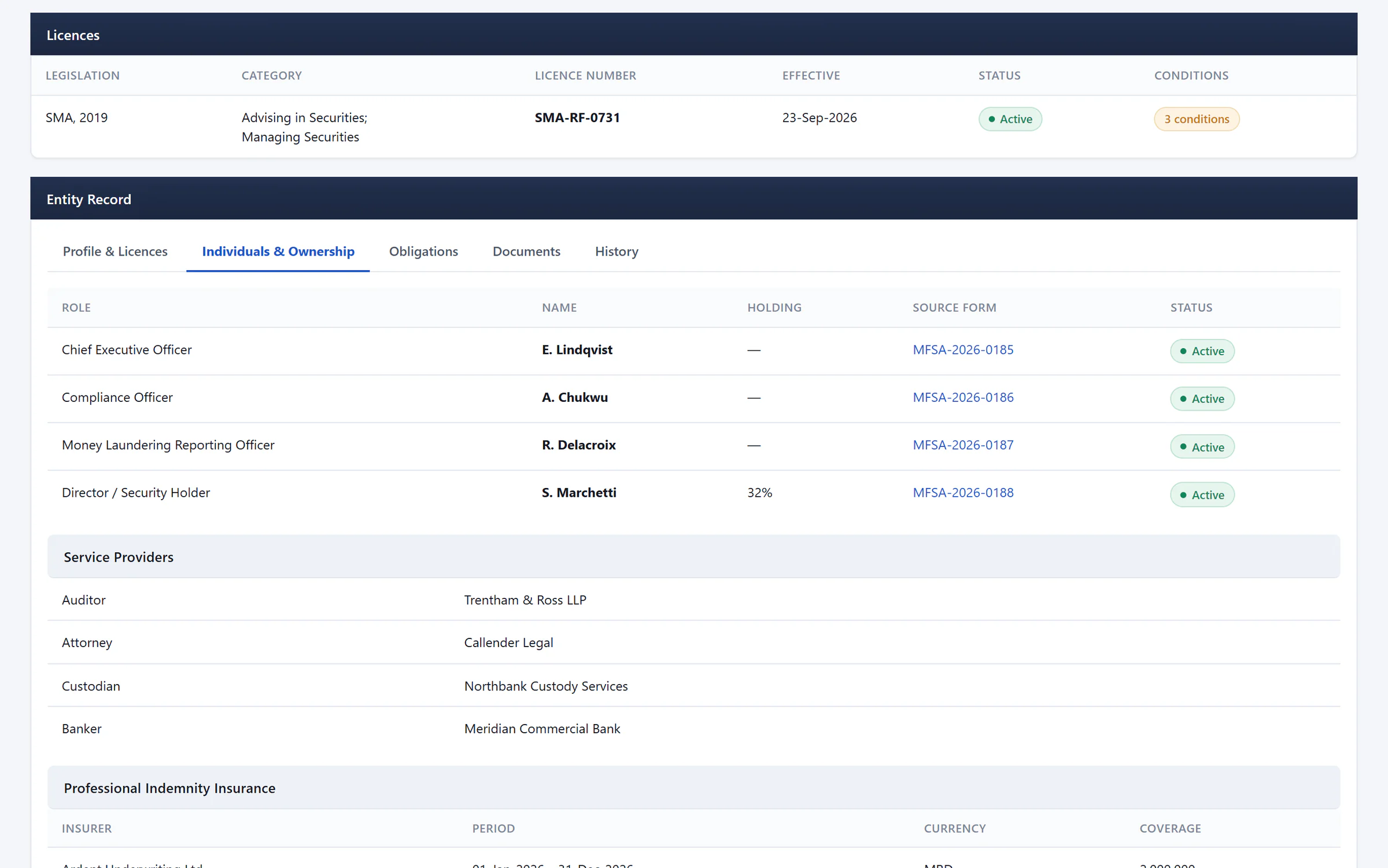

- Approved individuals, roles and holdings
- Each traced to its source form
- Service providers on the same record
See the people and relationships behind the regulated entity.
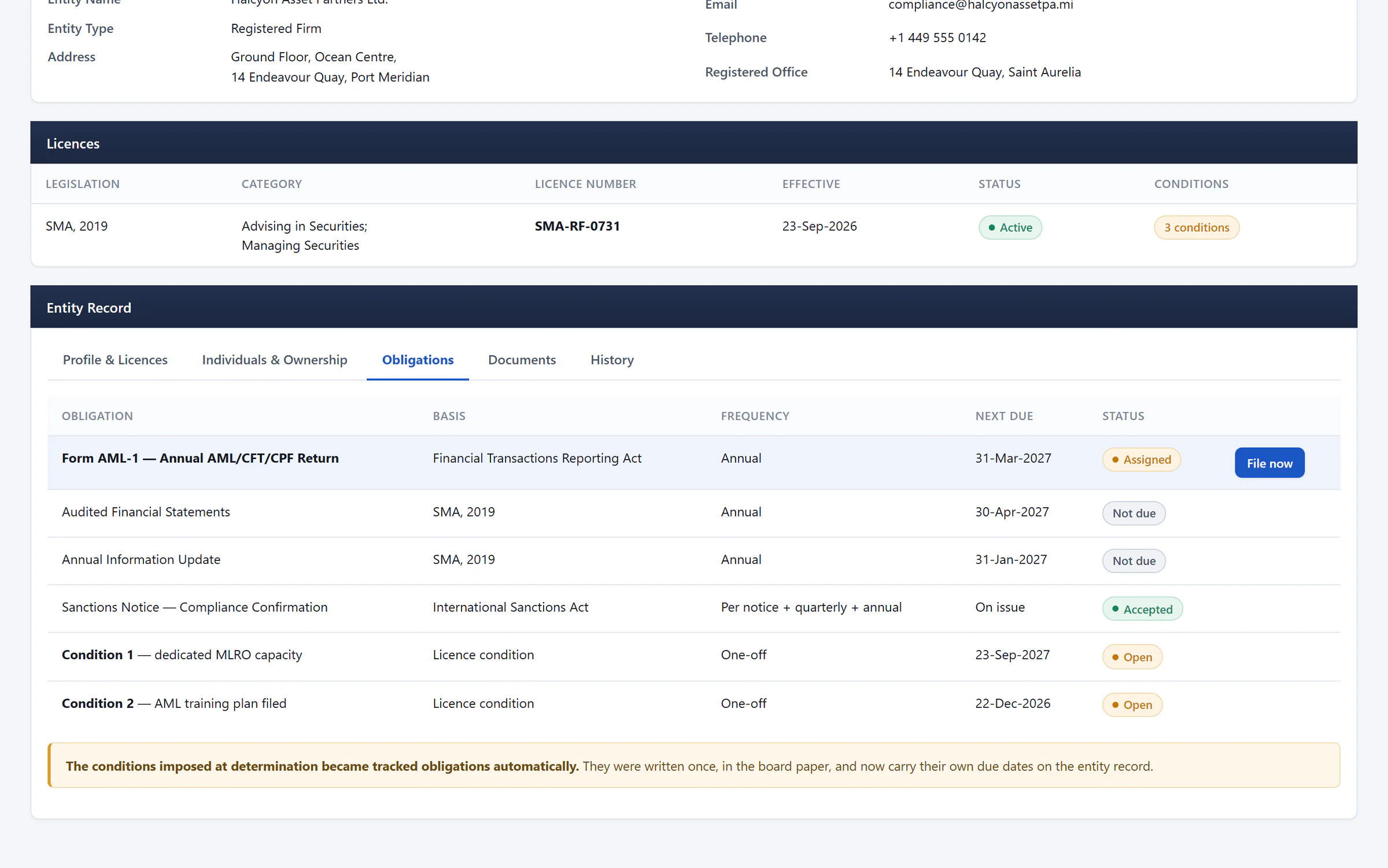

- Obligations with legal basis and frequency
- Licence conditions tracked as obligations
Follow what is due under each Act and licence condition.
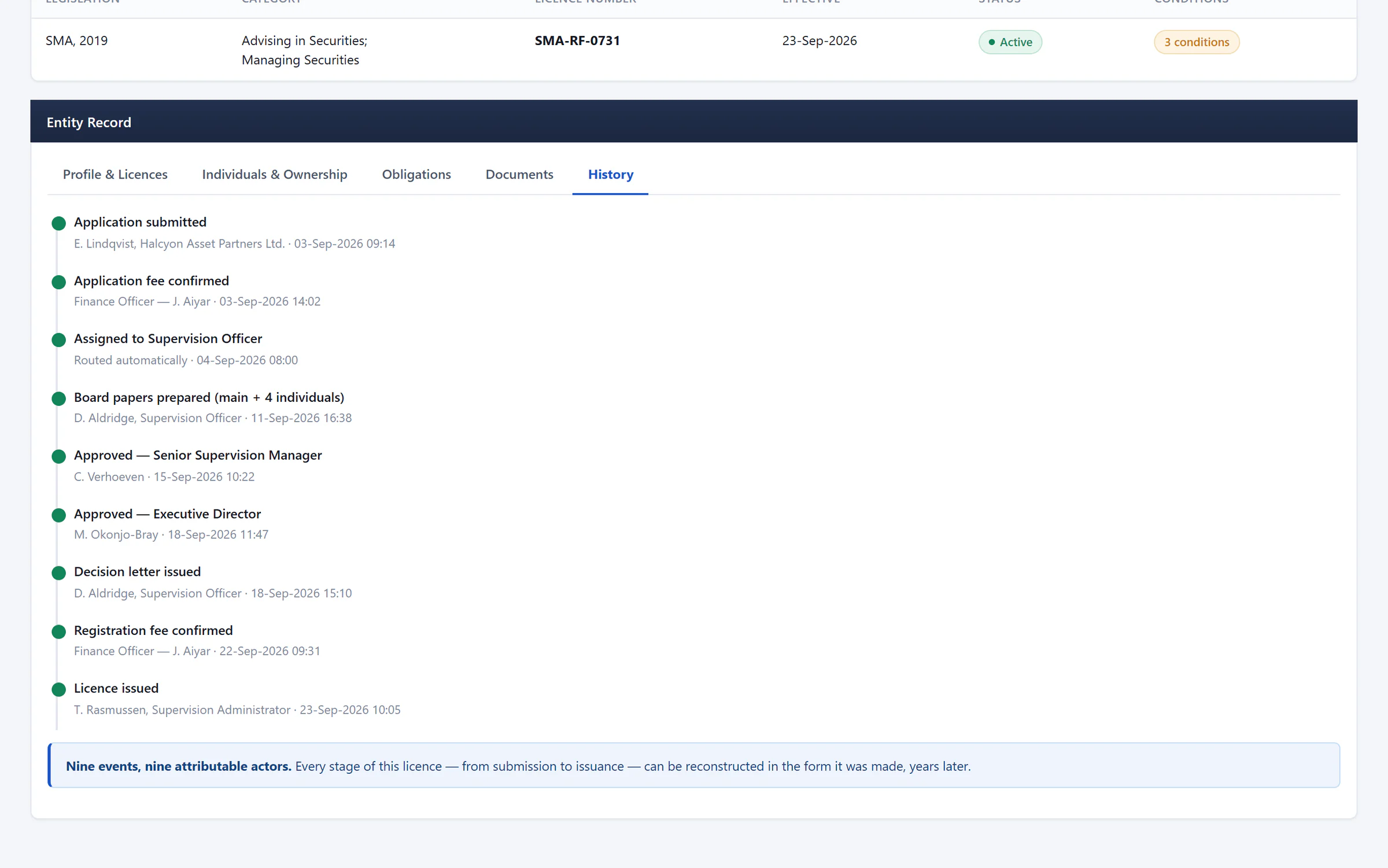

- Every lifecycle event, with its actor
- Nine events, nine attributable actors
See what changed and what happened before, with every actor recorded.
Your oversight
Know what is due. See what needs attention.
Track filings, licence conditions and regulatory notices against the entities they apply to. See outstanding responses and keep the follow-up connected to the underlying record.
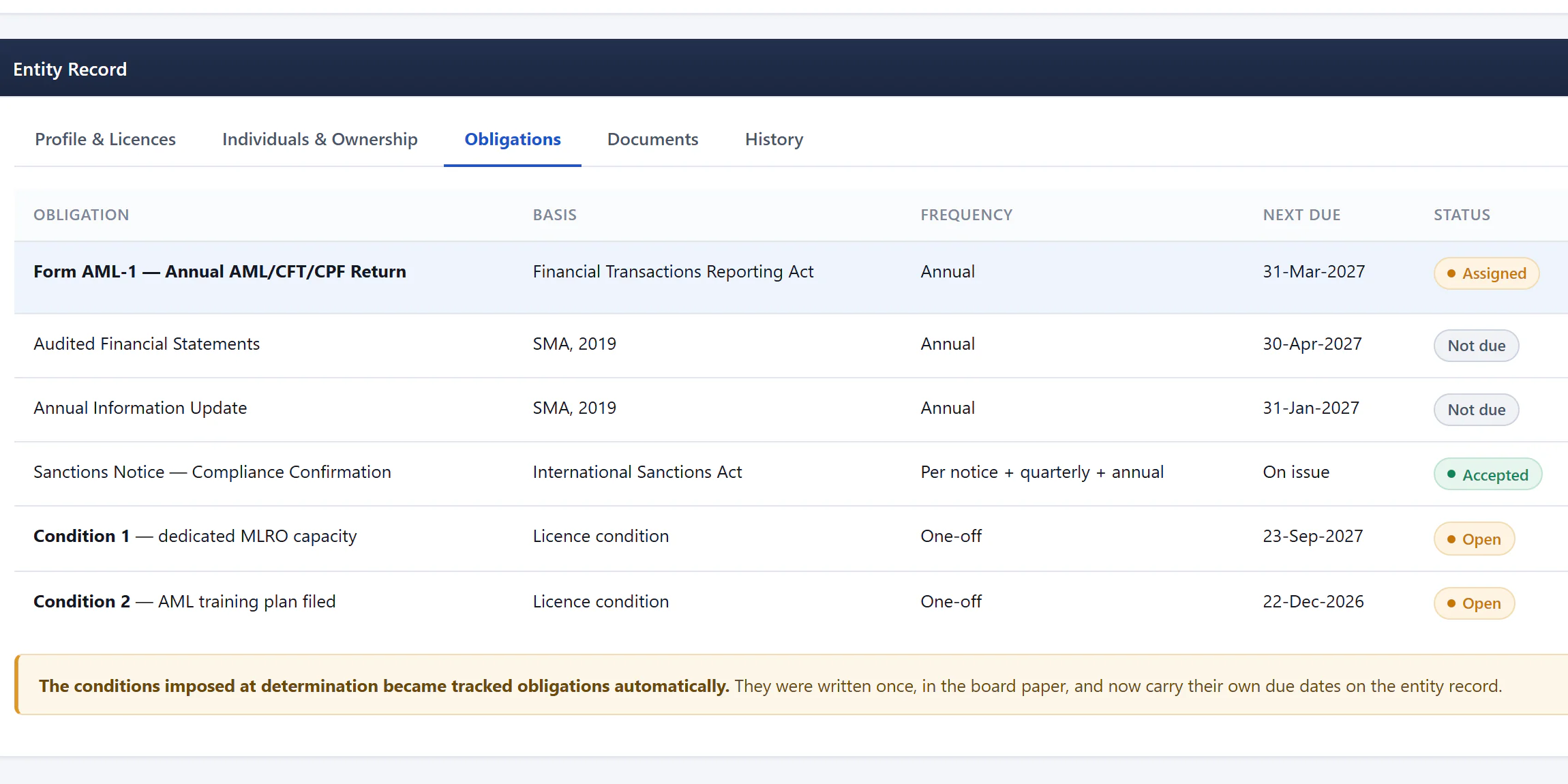

- Next due date for each requirement
- Submission status
- Conditions carry their own due dates
See the requirement, due date, submission status and responsible entity together.
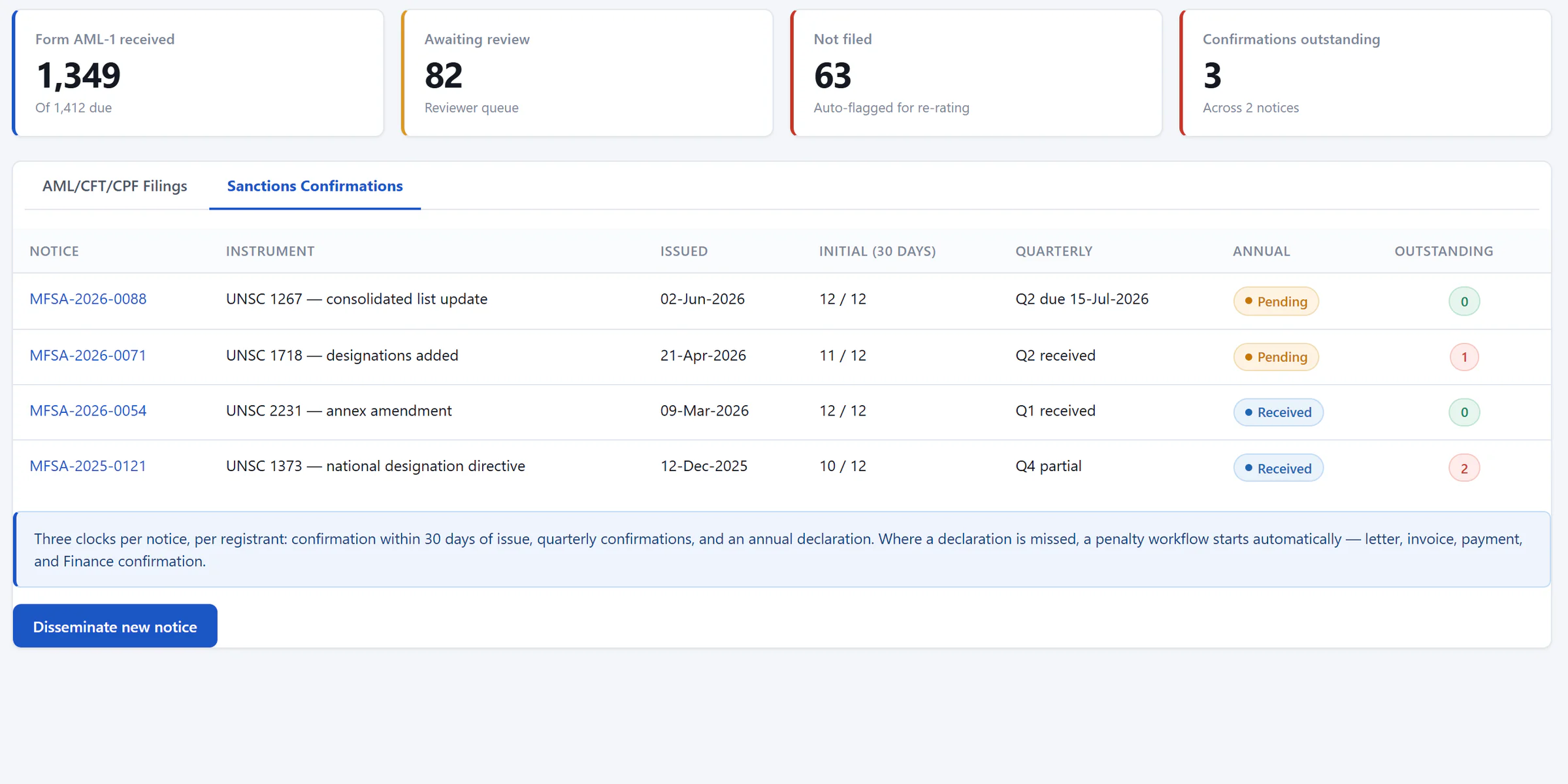

- Confirmations outstanding across notices
- Initial, quarterly and annual responses per notice
- Outstanding confirmations to follow up
Track responses to notices concerning UN Security Council sanctions obligations, including outstanding confirmations and follow-up.
Clear for the licensee. Controlled for the authority.
Licensees submit information, respond to requests and track their own obligations. Officers review the responses, manage exceptions and retain the supervisory history.
- Regulated entities
- ReguFlow Pro
- Authority teams
Compare what each side can see
| Access | Entity | Authority |
|---|---|---|
| Own submissions and status | Yes | Yes |
| Obligations and due dates | Yes | Yes |
| Risk rating and rationale | No | Yes |
| Examination workpapers | No | Yes |
| Finding severity | No | Yes |
| Any other entity’s record | No | Per assignment |
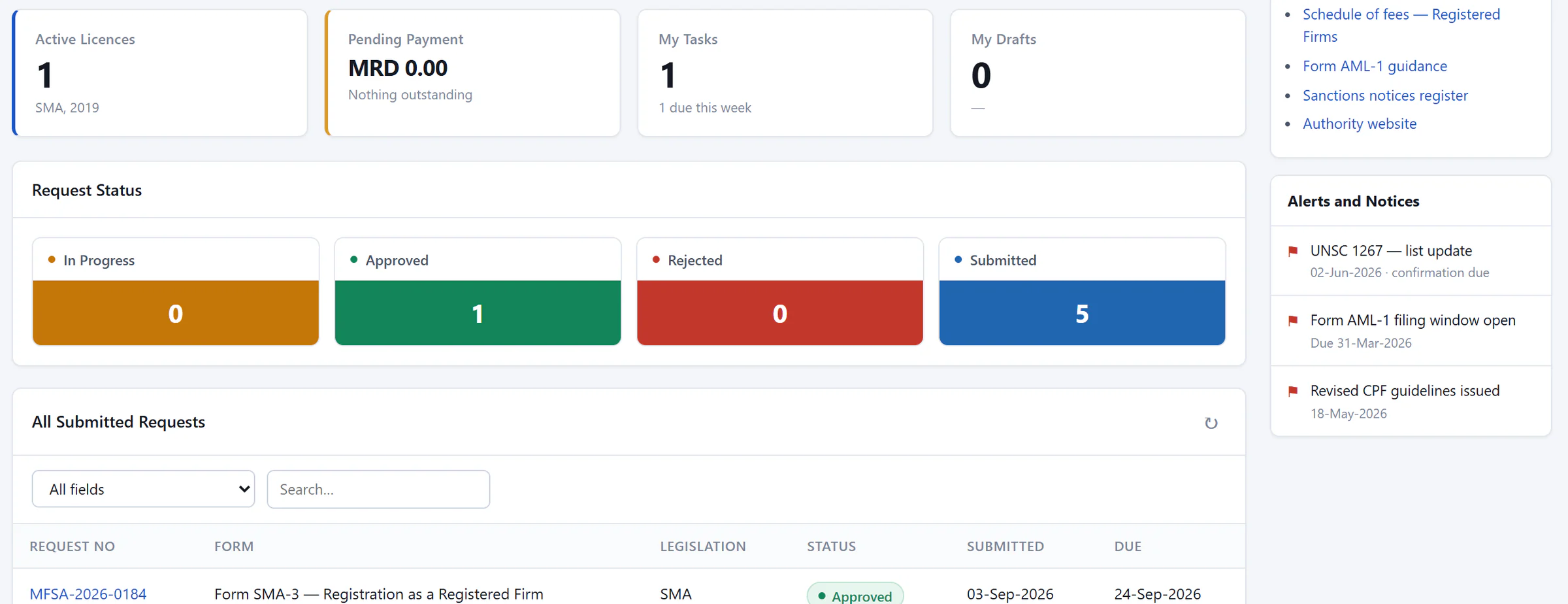

- The licensee’s licences, payments and tasks
- Status of every request
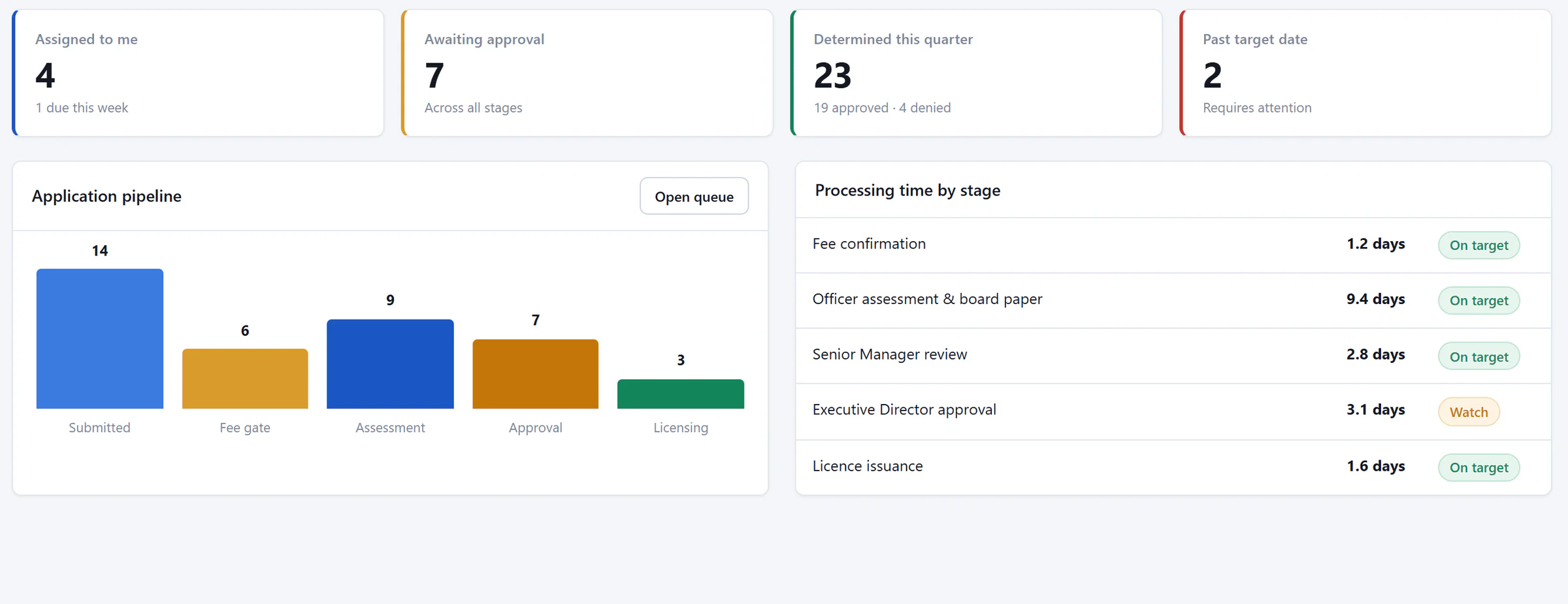

- Assigned work and items past target
- Application pipeline by stage
- Processing time against target
AML supervision
From risk signals to supervisory action.
The AML supervision module brings risk assessments, examination work and remediation into the connected supervisory record—helping teams prioritise attention and document their response.
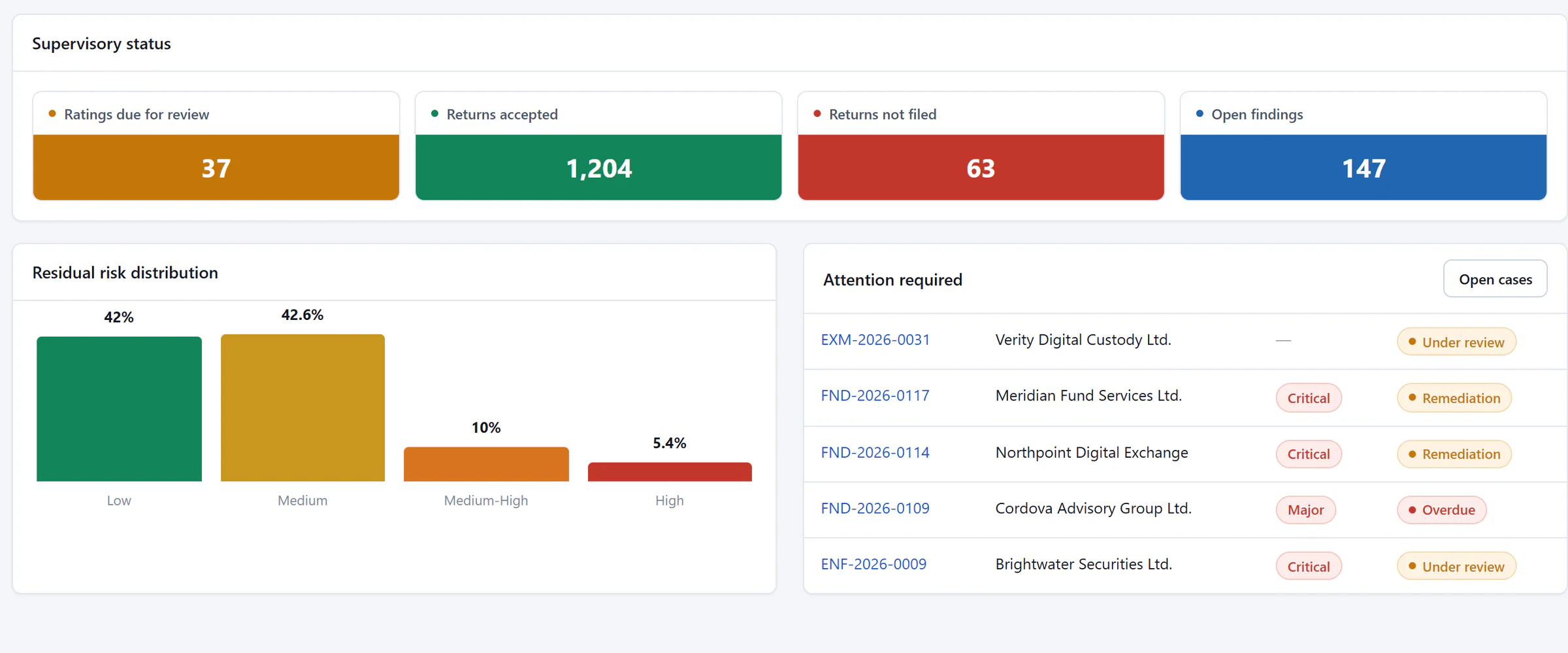

- Supervisory status across the population
- Residual risk distribution
- Entities requiring attention
See risk distribution and the entities requiring attention.
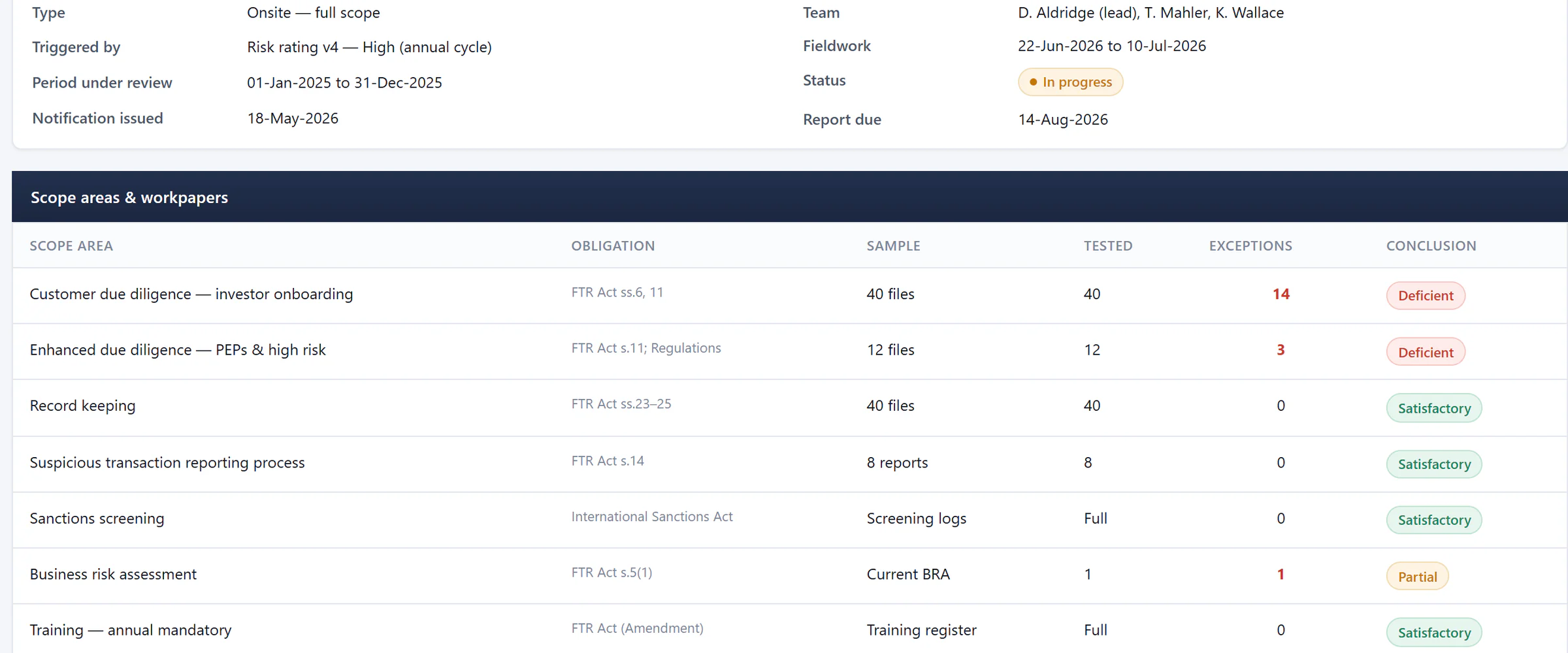

- Triggered by the entity’s risk rating
- Exceptions found in each scope area
- A conclusion for every scope area
Connect scope, workpapers, evidence and findings.
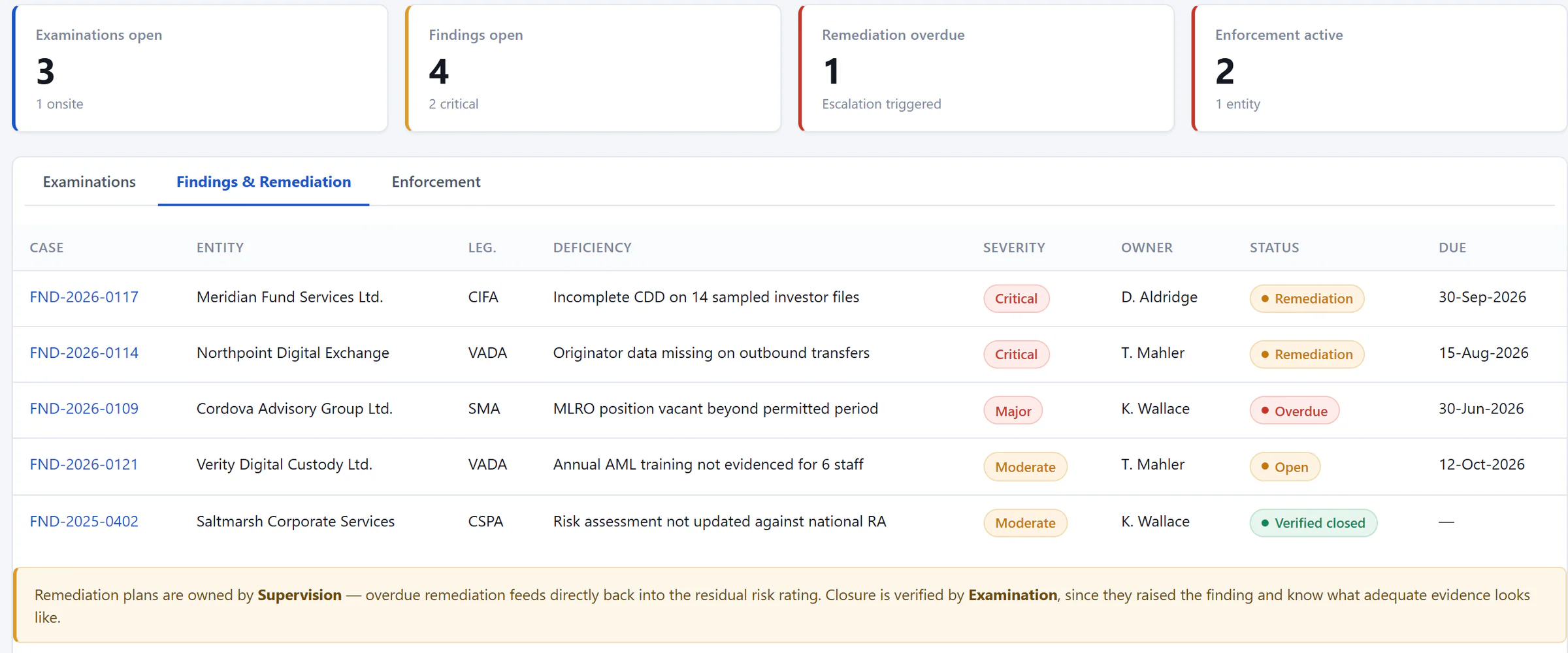

- Overdue remediation visible at once
- Severity and owner for every finding
- Status and due date to verified closure
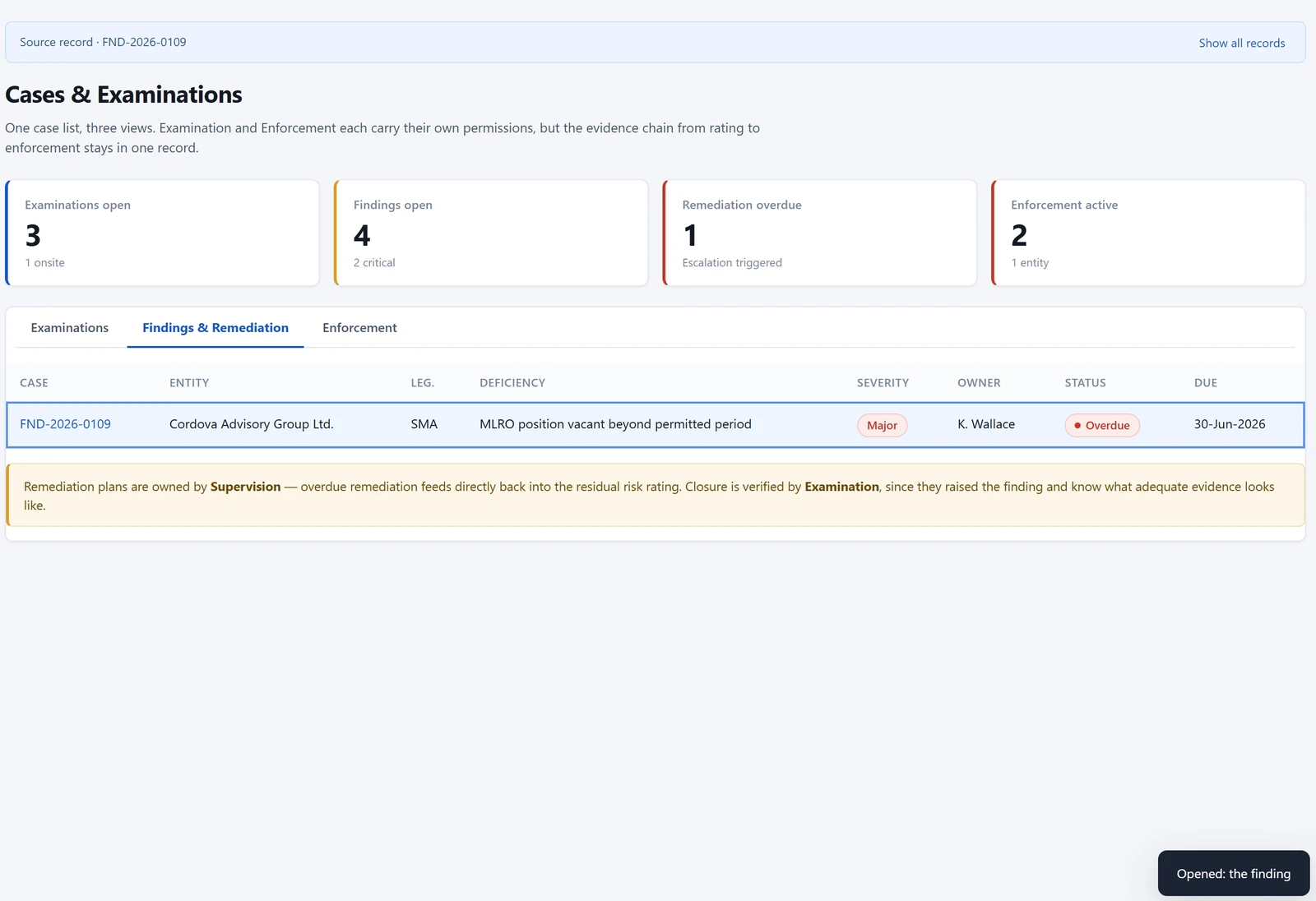
Track findings by severity, owner, due date and closure status.
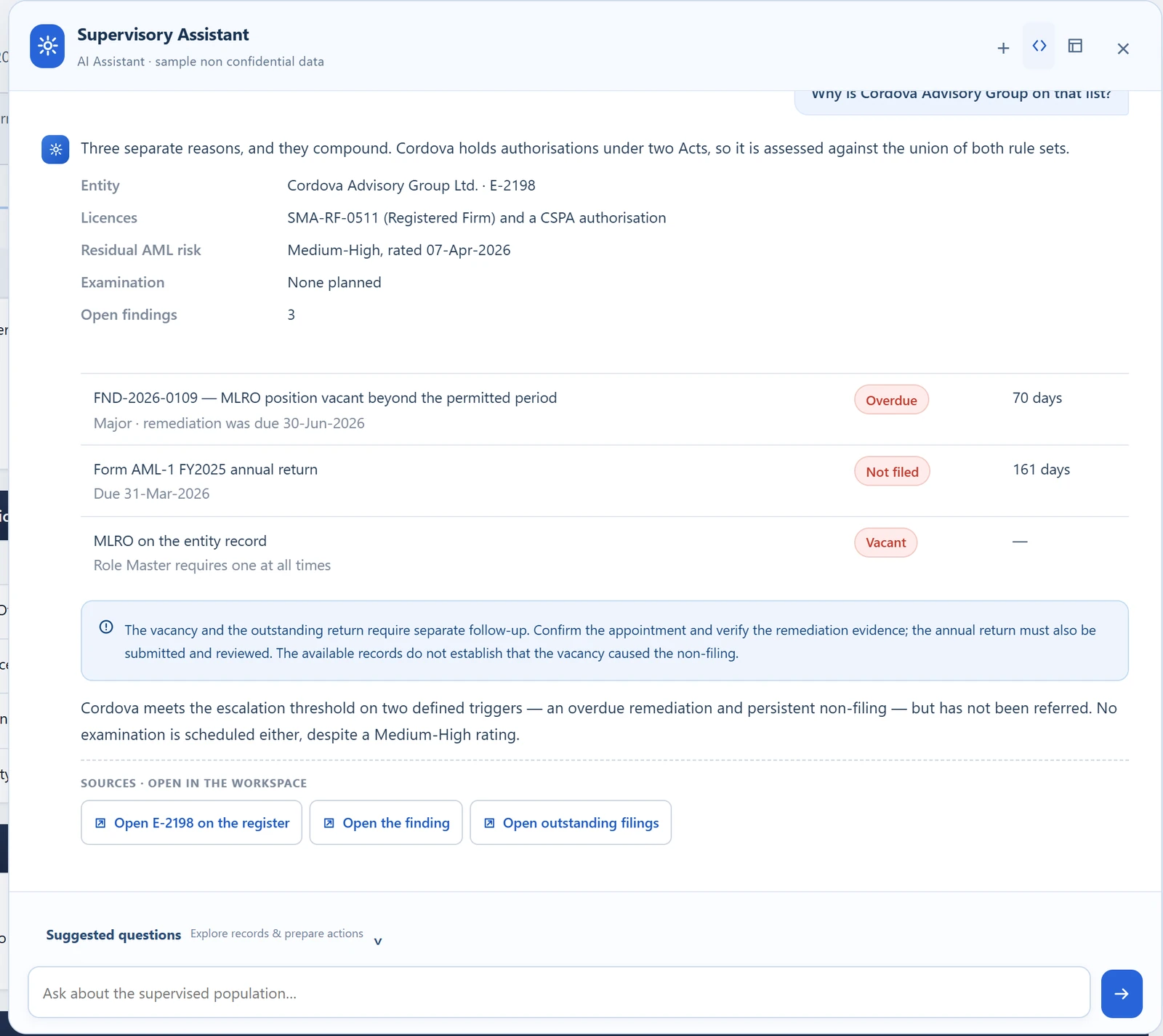
AI Assistant
Ask the question. Follow the evidence.
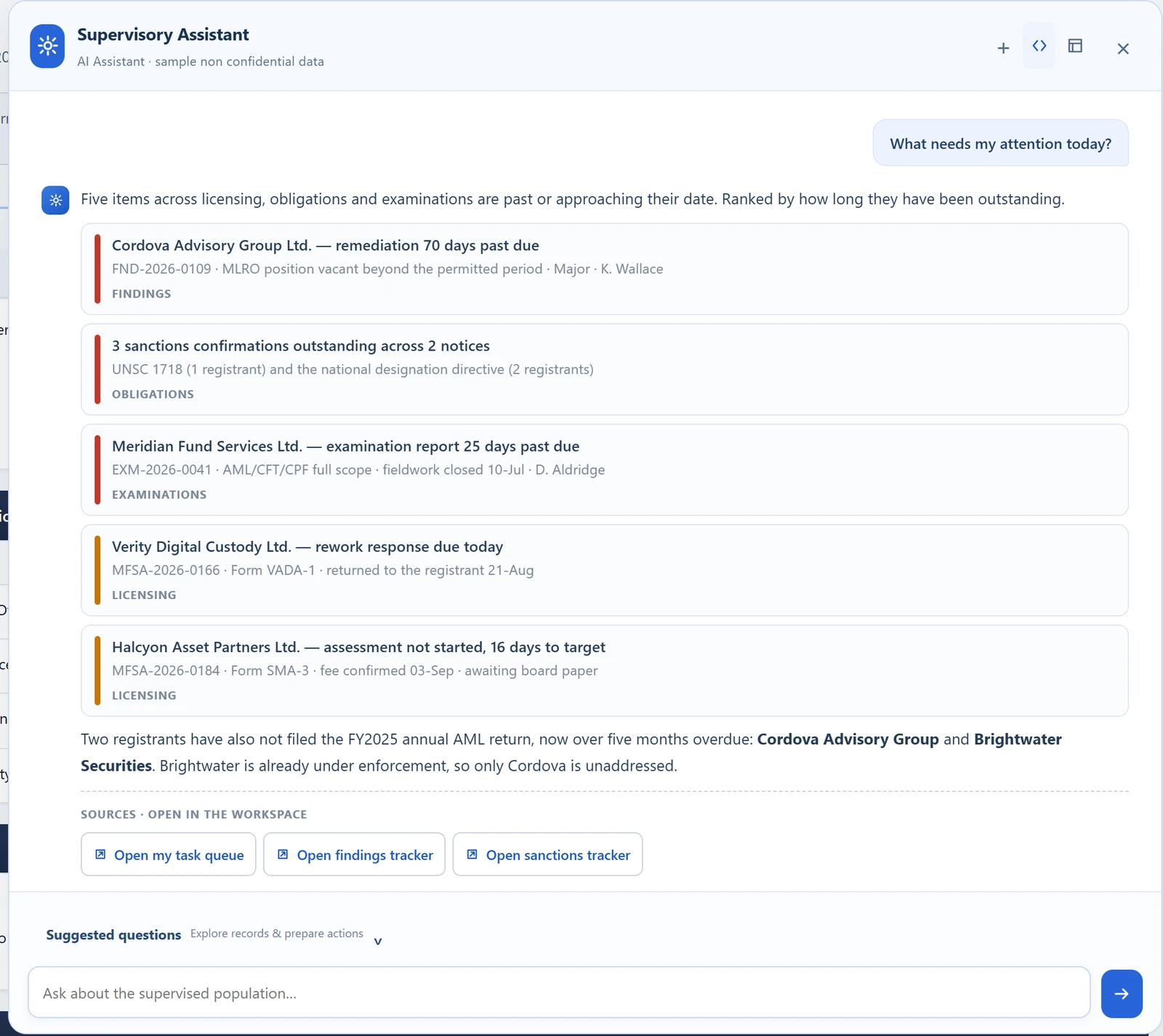
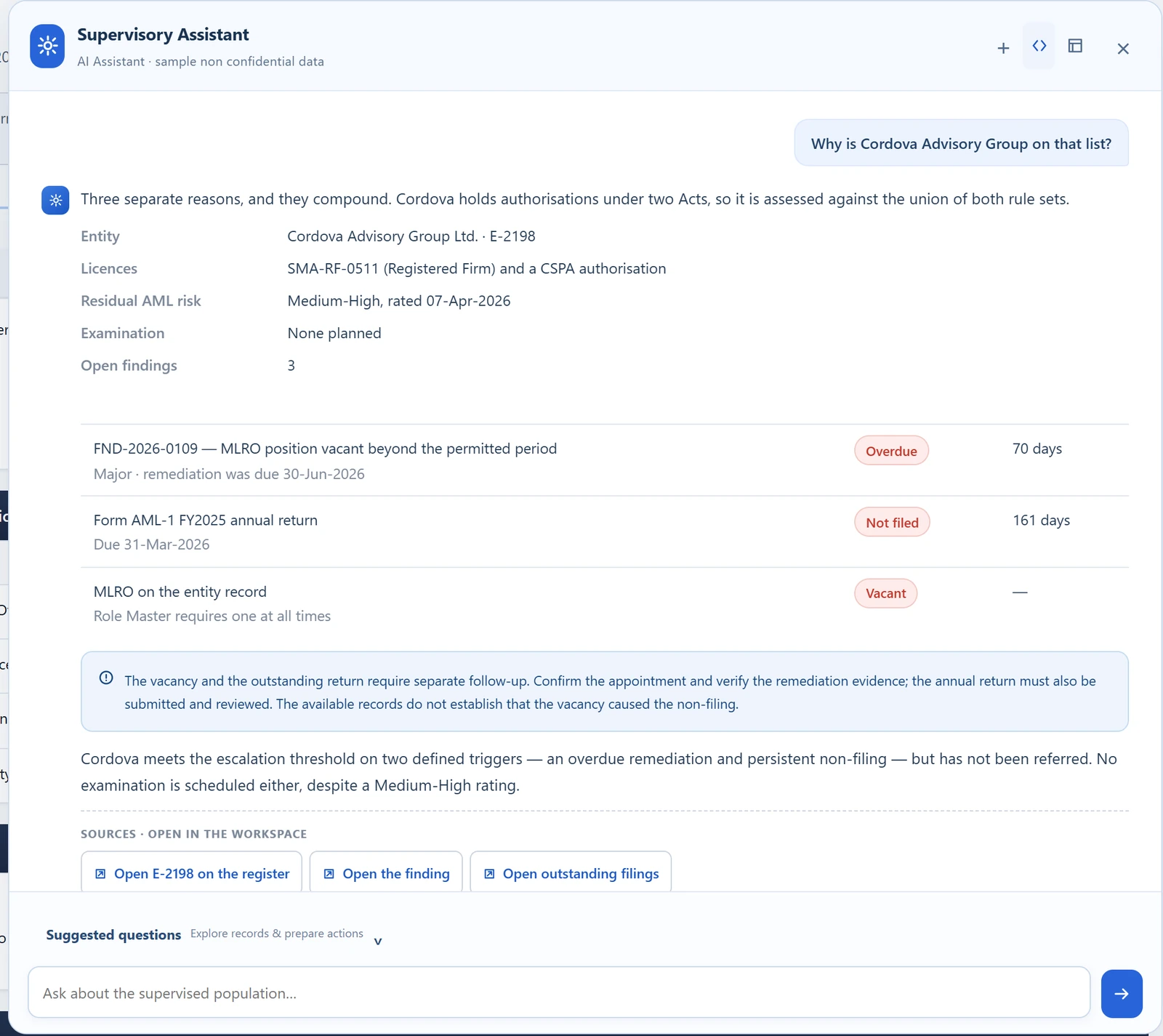
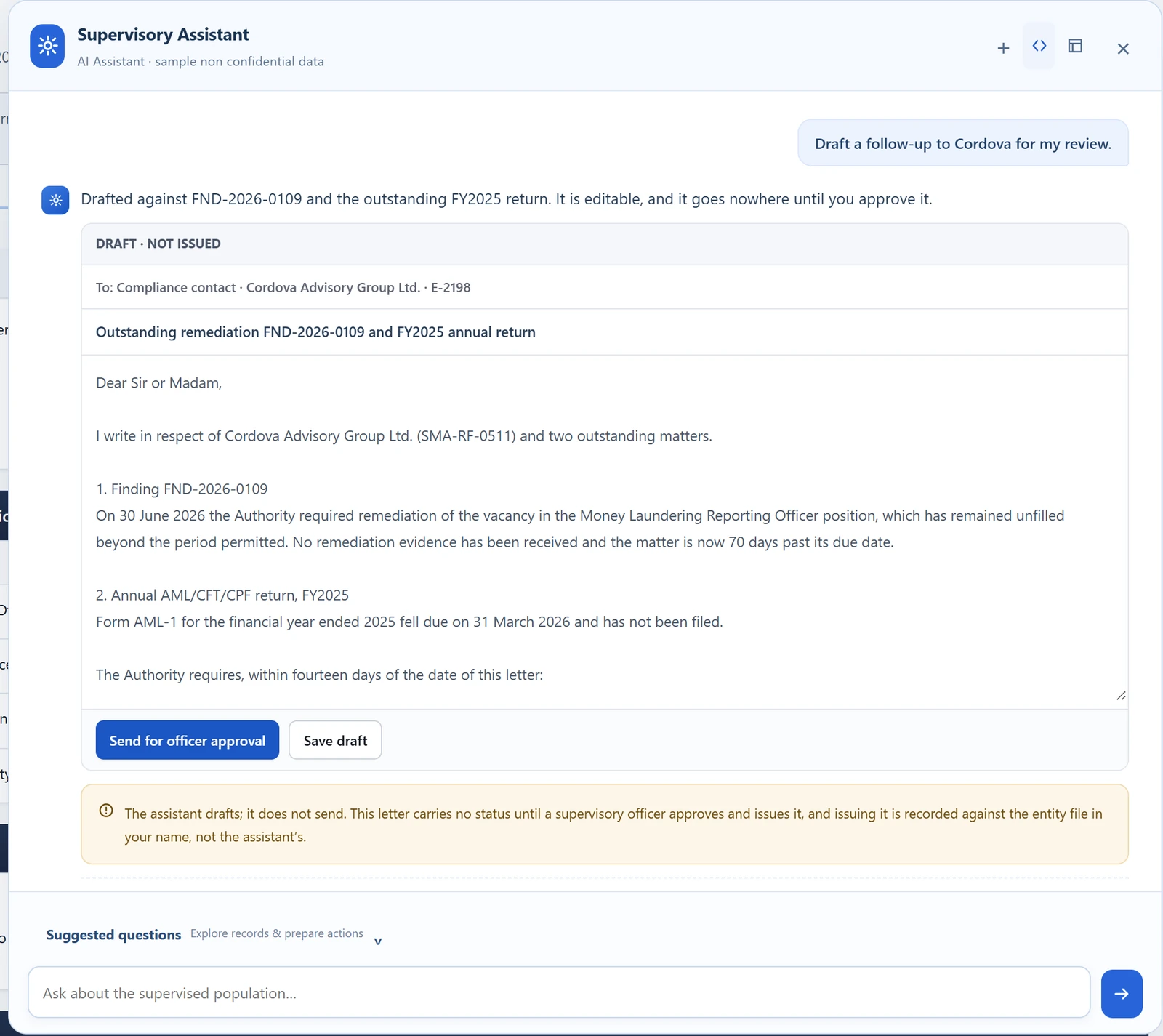
The assistant helps officers understand outstanding work, find the supporting records and prepare follow-ups for review.
Designed to run within the authority’s own network, with access governed by user permissions.
- Understand the issue.
- Open the source.
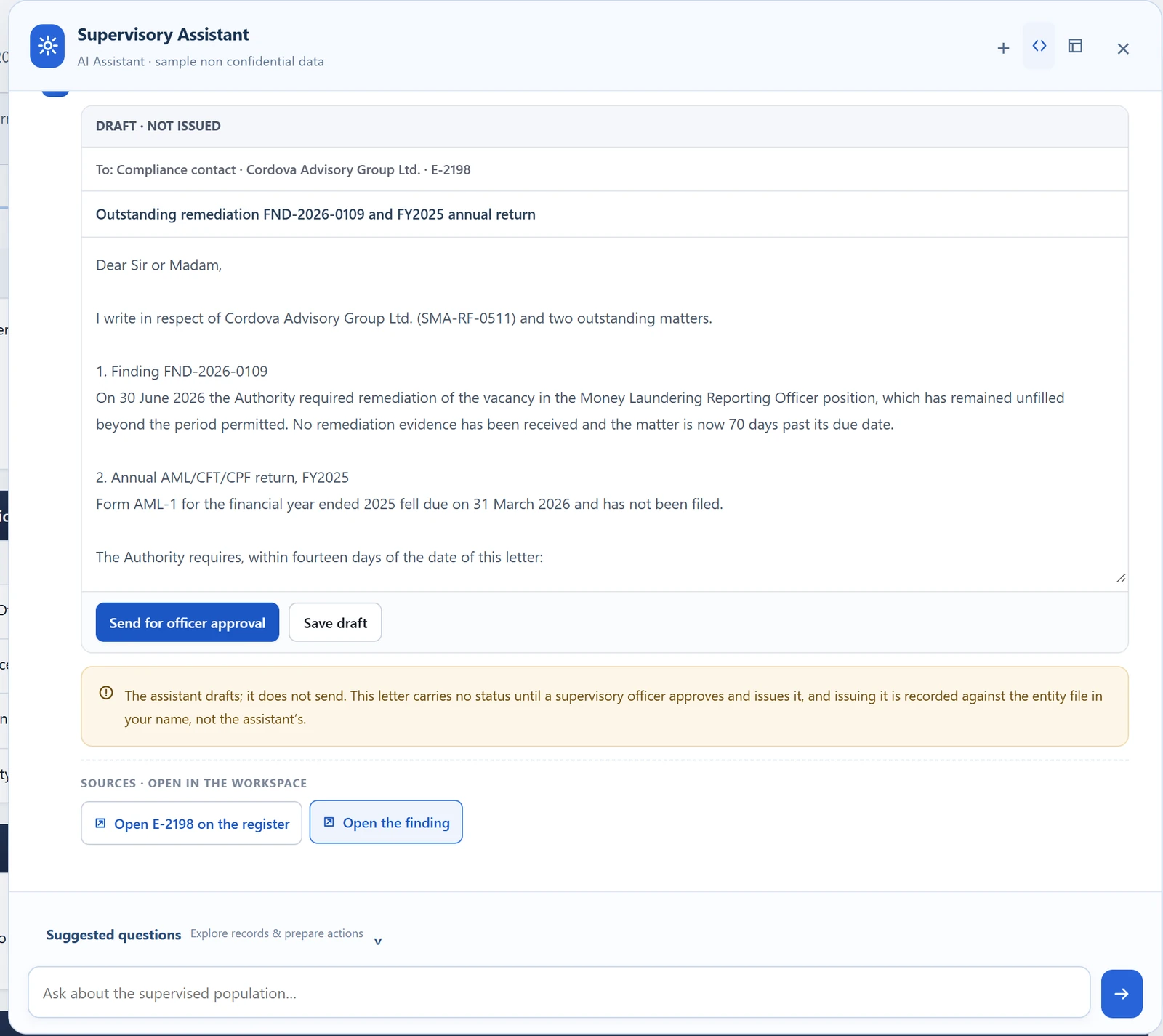
- Review the next step.

Demonstration using sample non-confidential data.
Follow the sequence step by step
Explore private deployment
Private AI, grounded in your records. Security and integration details are confirmed with your IT team during implementation.
Authority network
- OfficerExisting identity and permissions
- Assistant servicePermission-checked retrievalRead-only source access
- Local modelRuns within the authority network
- Approved recordsStructured data and documentsSource references and audit
Human review before action. No external model service in this design.
Built around your authority
Start with your priorities. Build from there.
Whether you are introducing your first regulatory portal or modernising an existing process, implementation starts with your legislation, operating procedures and priority workflows.
Your regulatory framework
Map licence categories, forms, obligations and approval responsibilities to your mandate.
Your operating environment
Assess deployment, identity, document, payment and other integration requirements with your team.
Your existing records
Plan migration and reconciliation of the licence and entity information you need to carry forward.
Your first phase
Agree a focused starting scope, then extend the platform as further workflows are introduced.
Deployment, security and data detail
- Deployment optionsCloud, on-premises, or hybrid, chosen to match your jurisdiction’s requirements on where regulatory data may reside.
- Security controlsRole-based access control down to the record level, encryption in transit and at rest, access logging, and administrative separation of duties.
- Data migrationExisting licence records, entity data, and case history migrated with integrity checks and reconciliation against source. Historical records remain searchable in the new system rather than archived out of reach.
- IntegrationPayment providers, identity and authentication services, document stores, corporate registries, and reporting or analytics tools, via documented interfaces.
- Data ownership & portabilityYour data remains yours and is exportable in a usable form. No commercial lock-in through data inaccessibility.
Platform capabilities
Match the platform to your requirements.
Review the areas most relevant to your authority, then use a demonstration to examine the fit in detail.
- Core platform
- Platform functionality, configured to your framework.
- Configuration & development scope
- Defined with your team for your environment.
Licensing, applications and assessmentsCore platformDigitize the end-to-end market-entry process from application through assessment, determination and licence issuance.
- New applications
- Registrations
- Renewals
- Variations
- Linked personal questionnaires
- Controller and key-person records
- Structured multi-step forms
- Save and resume
- Required documents
- Submission validation
- Assignment and task routing
- Rework and information requests
- Review and recommendation
- Delegated and multi-level approvals
- Approval in principle
- Approval with conditions
- Refusal
- Decision correspondence
- Fee confirmation gates
- Licence number and effective date
- Licence certificate
- Licence history
Entity records, people and ownershipCore platformMaintain one current supervisory profile across licences, people, relationships, obligations and history.
- Entity profile
- Licence and registration details
- Multiple licences on one record
- Ownership and shareholders
- Controllers
- Directors and officers
- Compliance roles
- Service providers
- Insurance details
- Addresses and contacts
- Related entities
- Documents
- Status changes
- Material changes
- Correspondence
- Entity history
To confirm during evaluation
- Public register publication, where your mandate requires one
Filings, conditions and noticesCore platformCollect recurring and event-driven regulatory information against the entity and requirement that produced it.
- Periodic regulatory returns
- Audited financial statements
- Annual information update
- Material-change notifications
- Conditions and undertakings
- Recurring attestations
- Notices and declarations
- Notice confirmations and outstanding responses
- Ad-hoc information requests
- Rejection and rework reasons
- Due dates
- Extension requests
- Reminders
- Overdue monitoring
- Status tracking
- Submission history
Workflow, permissions and audit historyCore platformKeep actions, evidence, recommendations and approvals attributable, under a regulatory configuration the authority controls.
- Attributed and timestamped actions
- Decision rationale and evidence
- Maker-checker and separation of duties
- Workflow, routing and approval thresholds
- Role constraints and permissions
- Legislation and licence category master
- Form and validation configuration
- Correspondence templates
- Versioned reference data
- Access logging
To confirm during evaluation
- Immutable history
- Point-in-time reconstruction
- Statutory retention and disposal
Integration, migration and deploymentConfiguration & development scopeAssessed with your IT team and agreed as part of the implementation scope.
- Cloud, on-premises or hybrid deployment options
- Identity and authentication services
- Payment providers
- Document stores
- Corporate registries
- Reporting and analytics tools
- Migration of licence, entity and case records
- Reconciliation against source
- Data export in a usable form
AML supervision and AI capabilitiesCore platformRisk-based AML supervision, and an AI Assistant that works from the authority’s own records and leaves every action for officer review.
- Inherent and control risk factors
- Versioned risk ratings with rationale
- Maker-checker approval of ratings
- Supervisory planning and prioritisation
- Population and sector risk aggregation
- Examination scope, workpapers and evidence
- Findings with severity and obligation linkage
- Remediation plans and verified closure
- AI Assistant: source-linked explanations of outstanding work
- AI Assistant: editable follow-up drafts left for officer review
- AI deployment within the authority’s network
To confirm during evaluation
- Re-rating triggers
- Repeat-finding detection
- Complaints, referrals and investigations
- Escalation, sanctions, directions and appeals
Common questions
Planning your next step?
Answers about jurisdiction fit, implementation and deployment.
Can it reflect our legislation and approval procedures?
Yes. Implementation maps your licence categories, application forms, required documents, obligations and approval responsibilities to the platform. We identify what can be configured and where additional development is required before agreeing the scope.
Can we start with one process?
Yes, including when you rely on email and spreadsheets today. A first phase can focus on one licensing, filing or approval process. The starting scope includes the relevant forms, responsibilities and records, with further workflows introduced in agreed stages.
Do we need to replace our existing portal or other systems?
Not necessarily. We assess which systems should remain, where integration is appropriate and what should change. Existing records, document systems, identity services and payment arrangements are considered during scoping.
Can the platform run within our own infrastructure?
On-premises and other deployment requirements are assessed with your IT team, including data residency, access and operational responsibilities. The AI Assistant is designed to operate within the authority’s own network.
What happens to our existing licence and entity records?
Migration planning identifies the records to carry forward, the mapping and cleanup required, and how the results will be reconciled against the source. Migration scope and responsibilities are agreed before implementation.
Which capabilities are included?
ReguFlow Pro covers licensing and applications, entity records, filings and obligations, workflow and audit history, AML supervision and the AI Assistant. Evaluation confirms which capabilities your first phase includes and separates configuration from any additional development.
What determines implementation time and cost?
Scope depends on the processes involved, forms and approval rules, migration, integrations and deployment requirements. Evaluation defines a practical first phase and separates configuration, additional development and ongoing support.
What should we bring to a demonstration?
Bring one licence type, filing obligation or approval process, along with its main steps and pain points. Your licensing, supervision and IT colleagues can help us examine the operational fit and identify the next steps.
See your regulatory workflow in ReguFlow Pro.
Bring one licence type, filing obligation or approval process. We’ll walk through the fit, identify the configuration and development required, and outline a practical first phase.
Include your licensing, supervision and IT colleagues.
What an evaluation looks like
Bring one real process
Not a generic tour. Tell us one licence type or filing obligation you administer, and we’ll show that process running in ReguFlow Pro.
Map the fit
We work through your functional and security requirements and tell you plainly what is configuration, what is development, and what we don’t do.
Validate technology and security
Architecture, deployment, migration, controls and your IT team’s questions answered directly rather than through a sales channel.
Define the first phase
Scope, sequence and cost, structured so the most valuable working module is chosen and sequenced before the full programme is committed.